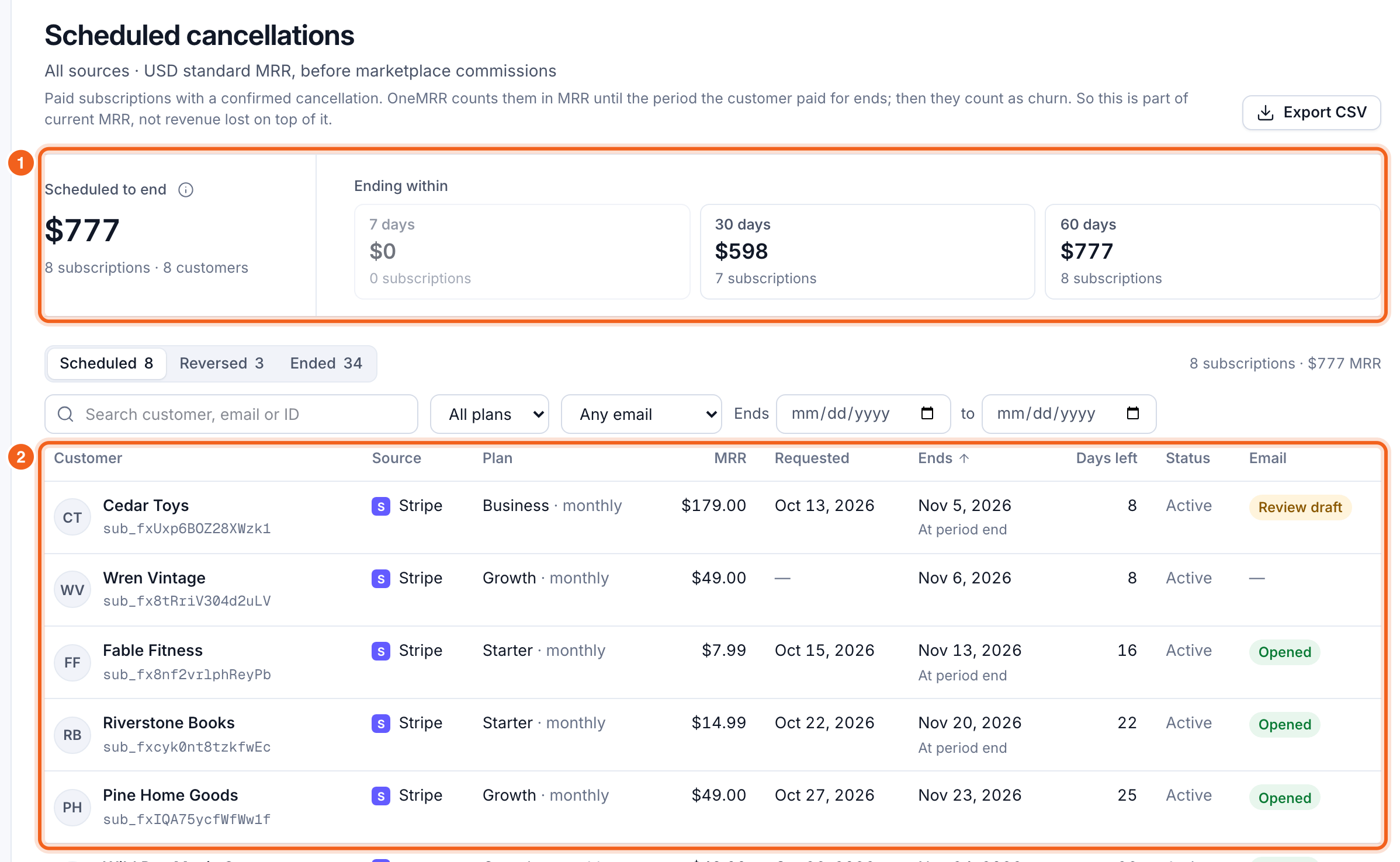
When a customer cancels “at the end of the period”, they keep paying until then. Churn & retention → Scheduled cancellations lists those subscriptions, so you can reach them while they’re still customers. OneMRR counts these subscriptions in MRR until the paid period ends; then they count as churn. So this is part of your current MRR, not revenue lost on top of it.
Scheduled cancellations, with the totals and the list numbered 1 and 2

The totals

  • Scheduled to end: the MRR of every subscription with a confirmed future cancellation, and how many subscriptions and customers.
  • Ending within 7, 30 and 60 days: how much is ending soon. The next 7 days is where to start.
The Overview also shows this in Needs your attention when anything is scheduled to end.

The list

Each row shows the customer, source, plan, MRR, when they asked to cancel, when it ends, the days left, and whether they’ve been emailed. Filter by plan, email status (draft to review, emailed, not emailed) or end date, and sort by MRR or end date. Select a customer to open their details. Export CSV downloads the list. Three tabs follow each cancellation through:
  • Scheduled: still paying, ending on a set date.
  • Reversed: the customer changed their mind before it took effect. Their MRR never left, so it isn’t counted as a reactivation.
  • Ended: the paid period ran out, and it now counts as churn.

Why Stripe shows lower MRR

Stripe removes a subscription from its MRR as soon as the cancellation is scheduled; OneMRR keeps it until it ends. That’s usually most of the gap between the two. Compare with platforms shows it as Set to cancel.

Reach them before they go

The Before it ends email goes to these customers a set number of days before their subscription ends. See Before it ends.