

Choose the period
- Decided in: emails sent, or held back, in the last 90 days, 180 days or year.
- Outcome measured after: how long after each email to look at what the customer did: 30, 60 or 90 days.
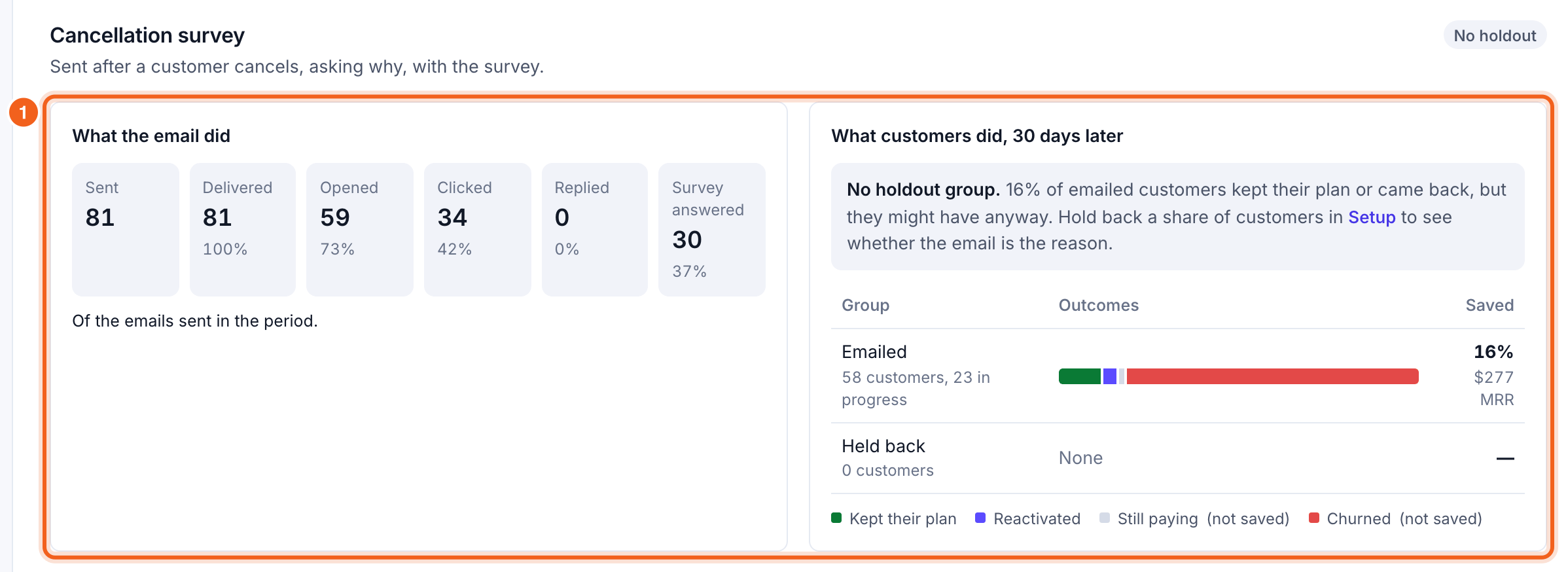
What the email did
Sent, delivered, opened, clicked and replied (and, for the Cancellation survey, survey answered), with how many weren’t sent. Delivery and opens come from Postmark’s reports; opens are estimates, since some mail apps load images automatically. Test emails never count.What customers did
For the emailed and held-back groups: who kept their plan, reactivated, is still paying, or churned, and the share saved, with its MRR. Customers still within the measurement window show as in progress. Above the groups, OneMRR says what the comparison shows:- The email made a difference: the emailed group did better, clear at 95% confidence, with about how much MRR stayed because of it.
- Emailed customers did worse: worth reviewing what the email says.
- No clear difference yet: the 95% range still includes zero. More customers will narrow it.
- Too early to compare: each group needs 20 customers whose outcome window has passed.
- No holdout group: OneMRR shows the emailed group’s outcomes, but says they might have stayed anyway.